Welcome to the ultimate deep dive into the world of the system board. Often called the motherboard, this crucial component is the beating heart of any computing device. From powering your laptop to enabling high-speed gaming rigs, the system board orchestrates every digital interaction. Let’s explore its secrets, evolution, and why it matters more than you think.


What Is a System Board and Why It Matters

The term system board might sound technical, but it’s the foundational circuit board in any computer system. Also widely known as the motherboard, it connects and enables communication between all hardware components—CPU, RAM, storage, GPU, and peripherals. Without it, your computer is just a box of disconnected parts.
The Core Definition of a System Board
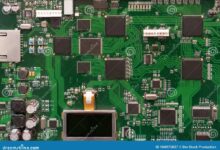
A system board is a printed circuit board (PCB) that houses the primary components of a computer. It provides electrical connections and pathways through traces—thin copper lines etched onto the board—allowing data and power to flow seamlessly between components. Every operation, from booting up to rendering 4K video, depends on the integrity and design of the system board.
- Acts as the central hub for all hardware components
- Enables communication via buses and chipsets
- Distributes power from the PSU to critical components
System Board vs. Motherboard: Are They the Same?
Yes, in most contexts, the terms system board and motherboard are used interchangeably. However, in enterprise or server environments, “system board” may refer to a more integrated solution, sometimes including onboard processors or specialized firmware. For consumer PCs, they mean the same thing.
“The system board is the backbone of modern computing—without it, there is no synergy between components.” — TechRadar Hardware Analysis, 2023
Evolution of the System Board: From Mainframes to Miniaturization
The journey of the system board mirrors the evolution of computing itself. What began as massive, room-sized circuit boards in the 1950s has transformed into compact, high-density boards powering smartphones and IoT devices today.
Early Computing and the Birth of System Boards
In the era of mainframes like the IBM 704, system boards were not integrated in the way we know them. Instead, computers used discrete logic units connected by wires. The concept of a unified board emerged in the 1970s with the rise of microprocessors. The Intel 4004, introduced in 1971, paved the way for integrated circuit boards that could support entire computing systems.
- 1960s–70s: Discrete components on large backplanes
- 1975: MITS Altair 8800 featured one of the first recognizable system boards
- 1981: IBM PC introduced the first standardized motherboard architecture
Standardization and the Rise of ATX
A major turning point came in 1995 when Intel introduced the ATX form factor. This standard defined the size, layout, power connectors, and mounting points for system boards, making them more compatible across cases and power supplies. ATX replaced the older AT (Advanced Technology) standard, offering better airflow, easier upgrades, and improved power management.
- ATX allowed for soft power switches and better thermal design
- Enabled front-panel USB and audio connectors
- Became the de facto standard for desktops worldwide
Key Components Found on a System Board
A system board is not just a slab of green fiberglass—it’s a complex ecosystem of components working in harmony. Understanding these parts helps you make informed decisions when upgrading or troubleshooting.
CPU Socket and Chipset
The CPU socket is where the processor is installed. It’s designed to match specific processor families (e.g., LGA 1700 for Intel 12th–14th Gen or AM5 for AMD Ryzen 7000 series). The chipset, usually located near the CPU, acts as a traffic controller, managing data flow between the CPU, RAM, storage, and peripherals.
- Chipsets determine supported RAM types, PCIe lanes, and overclocking capabilities
- Examples: Intel Z790, AMD X670E
- Northbridge and southbridge functions are now integrated into modern chipsets
RAM Slots and Memory Support
System boards feature DIMM (Dual In-line Memory Module) slots for installing RAM. The number of slots and supported memory type (DDR4, DDR5) depend on the board’s design and chipset. High-end boards support ECC (Error-Correcting Code) memory, crucial for servers.
- Most consumer boards have 2–4 DIMM slots
- DDR5 offers higher bandwidth and efficiency over DDR4
- Support for XMP (Intel) or DOCP (AMD) profiles enables easy overclocking
Expansion Slots: PCIe and Legacy Interfaces
Peripheral Component Interconnect Express (PCIe) slots allow you to add GPUs, NVMe SSDs, sound cards, and Wi-Fi adapters. The number and version (e.g., PCIe 4.0, 5.0) impact performance. A modern system board typically includes:
- One x16 slot for graphics cards
- One or more x4 or x1 slots for expansion
- M.2 slots for ultra-fast NVMe SSDs
“The PCIe 5.0 standard doubles the bandwidth of PCIe 4.0, making it essential for next-gen GPUs and storage.” — Tom’s Hardware, 2023
Types of System Boards: Matching Form Factors to Needs
Not all system boards are created equal. They come in various sizes and configurations, known as form factors, each suited for different use cases—from compact home theater PCs to high-end gaming rigs.
ATX: The Standard Workhorse
ATX (Advanced Technology eXtended) is the most common form factor for desktops. Measuring 12 x 9.6 inches (305 x 244 mm), it offers ample space for multiple PCIe slots, RAM, and cooling solutions. It’s ideal for mid-tower and full-tower builds.
- Supports 4+ RAM slots and 3+ PCIe slots
- Best for gaming, content creation, and workstations
- Widely supported by cases and PSUs
Micro-ATX: Compact Without Compromise
Micro-ATX (mATX) boards are smaller (9.6 x 9.6 inches) but retain many ATX features. They usually have fewer expansion slots but are fully compatible with ATX cases. This makes them perfect for budget builds or compact setups where space is limited.
- Typically supports 2–4 RAM slots
- 1–2 PCIe x16 slots
- Cost-effective and energy-efficient
Mini-ITX: Power in a Tiny Package
Measuring just 6.7 x 6.7 inches, Mini-ITX is the smallest mainstream form factor. Designed for HTPCs (Home Theater PCs), small form factor (SFF) builds, and embedded systems, it sacrifices expansion for size. However, modern Mini-ITX boards can still support high-end CPUs and GPUs.
- Limited to one PCIe slot and two RAM slots
- Popular in custom SFF gaming rigs
- Requires specialized cases and cooling
How to Choose the Right System Board for Your Build
Selecting the right system board is critical to ensuring compatibility, performance, and future upgradeability. It’s not just about price—it’s about matching the board to your CPU, case, and intended use.
Compatibility with CPU and RAM
The first rule: your system board must support your chosen CPU. Intel and AMD use different sockets, so a board designed for one won’t work with the other. Similarly, DDR4 and DDR5 RAM are not interchangeable. Always check the manufacturer’s QVL (Qualified Vendor List) for supported components.
- Intel LGA 1700 supports 12th–14th Gen CPUs
- AMD AM5 supports Ryzen 7000 and future CPUs
- DDR5 is backward incompatible with DDR4 slots
Features and Connectivity Options
Modern system boards come packed with features. Look for:
- Wi-Fi 6E and Bluetooth 5.3 for wireless connectivity
- Multiple M.2 slots for NVMe SSDs
- USB 3.2 Gen 2×2 (20 Gbps) and USB-C ports
- 2.5Gb or 10Gb Ethernet for high-speed networking
- BIOS flashback buttons for easy firmware updates
Budget vs. High-End: Finding the Sweet Spot
You don’t always need the most expensive board. For a basic office PC, a budget B-series chipset (e.g., B760 or B650) is sufficient. Gamers and creators should consider Z-series (Intel) or X-series (AMD) boards for overclocking and advanced features. However, avoid overpaying for features you won’t use.
- Budget: B760 (Intel), B650 (AMD) – no overclocking
- Mid-range: Z790 (Intel), X670 (AMD) – full overclocking support
- Premium: Z790 Aorus Xtreme, ASUS ROG Crosshair X670E – for enthusiasts
Troubleshooting Common System Board Issues
Even the most reliable system board can develop problems. Recognizing symptoms early can save time, money, and data.
Power-On Failures and No Display
If your PC won’t turn on or shows no display, the system board could be at fault. However, always rule out PSU, RAM, or GPU issues first. Check for:
- Swollen or leaking capacitors on the board
- Burnt smell or scorch marks near VRMs
- Ensure the 24-pin ATX and 8-pin EPS power connectors are secure
BIOS/UEFI Problems and Boot Errors
A corrupted BIOS can prevent booting. Symptoms include beeping sounds, stuck boot screens, or unrecognized hardware. Solutions include:
- Clearing CMOS via jumper or battery removal
- Using BIOS flashback to reflash firmware
- Updating BIOS from a USB drive
Overheating and VRM Failures
Voltage Regulator Modules (VRMs) supply clean power to the CPU. Poor cooling or low-quality components can cause VRM overheating, leading to throttling or shutdowns. Ensure adequate airflow and consider boards with robust heatsinks for high-TDP CPUs.
“Over 30% of motherboard failures are linked to VRM or capacitor degradation.” — PCWorld Reliability Report, 2022
Future Trends in System Board Technology
The system board is far from static. Innovations in materials, integration, and connectivity are shaping the next generation of computing.
Integration of AI and Onboard Diagnostics
Leading manufacturers like ASUS and MSI are embedding AI into system boards for real-time monitoring, overclocking optimization, and failure prediction. AI-powered BIOS can automatically tune voltages and fan curves for peak efficiency.
- ASUS AI Overclocking and AI Cooling
- MSI AI Power Gen5 for dynamic voltage adjustment
- Predictive maintenance alerts before hardware fails
Advanced Materials and Thermal Management
Future system boards may use graphene-based substrates or liquid cooling integration for better thermal conductivity. High-end boards already feature metal-reinforced PCIe slots and multi-layer PCBs to reduce signal interference and heat buildup.
- Graphene enhances heat dissipation by up to 50%
- Embedded thermal sensors for real-time monitoring
- Modular board designs for easier repairs
Modular and Customizable System Boards
The rise of open-source hardware and modular computing (e.g., Framework Laptop) suggests a future where users can customize their system board layout. Imagine swapping out audio, networking, or storage modules like LEGO bricks.
- Framework’s modular motherboard allows user upgrades
- Raspberry Pi Compute Modules for embedded use
- Potential for 3D-printed PCBs in niche applications
System Board in Servers and Enterprise Systems
In data centers, the system board takes on a more specialized role. These boards are designed for reliability, scalability, and remote management.
Server-Grade System Boards and Redundancy
Enterprise system boards often support ECC RAM, multiple CPUs, and redundant power inputs. They’re built with higher-quality components to endure 24/7 operation. Brands like Supermicro and ASUS RS series dominate this space.
- Support for dual or quad CPU sockets (e.g., LGA 4677)
- 10+ DIMM slots for terabytes of RAM
- IPMI (Intelligent Platform Management Interface) for remote monitoring
Blade Servers and High-Density Computing
In blade servers, system boards are slim, modular units that slide into a chassis. Each blade contains its own CPU, RAM, and storage, but shares power, cooling, and networking with others. This design maximizes computing density in data centers.
- Used in cloud infrastructure and virtualization
- Reduced cabling and power consumption
- Hot-swappable components for minimal downtime
Embedded System Boards in IoT and Automation
From smart thermostats to industrial robots, embedded system boards power the Internet of Things (IoT). These are often highly integrated, low-power boards like the NVIDIA Jetson or Intel NUC.
- Designed for low power consumption and long lifespans
- Often run Linux or real-time operating systems
- Used in medical devices, automotive systems, and smart cities
What is the difference between a system board and a motherboard?
The terms are generally interchangeable in consumer computing. However, “system board” is sometimes used in enterprise or embedded contexts to describe a more integrated or specialized board. In everyday use, both refer to the main circuit board of a computer.
Can a system board be repaired if damaged?
Minor issues like faulty capacitors can sometimes be repaired by skilled technicians using soldering tools. However, most damage—especially to traces, VRMs, or the CPU socket—is not economically repairable. Replacement is usually the best option.
How long does a system board last?
Under normal conditions, a quality system board can last 7–10 years. Lifespan depends on usage, cooling, power quality, and component quality. Server-grade boards may last longer due to superior build standards.
What happens if the system board fails?
If the system board fails, the computer will not boot. Symptoms include no power, no display, beeping sounds, or random shutdowns. Data on storage drives is usually safe, but the system cannot operate until the board is replaced.
Is it worth upgrading just the system board?
It depends. If your current board limits CPU or RAM upgrades, a new system board can breathe new life into an old build. However, ensure compatibility with your existing PSU, case, and cooling. Sometimes, a full platform upgrade is more cost-effective.
The system board is more than just a piece of hardware—it’s the silent conductor of your computer’s orchestra. From its humble beginnings in mainframes to powering AI-driven data centers, the evolution of the system board reflects the relentless pace of technological progress. Whether you’re building a gaming rig, maintaining a server, or exploring IoT, understanding the system board empowers you to make smarter, more informed decisions. As integration, efficiency, and intelligence continue to advance, the future of the system board promises even greater performance, reliability, and innovation. Stay curious, stay connected, and never underestimate the power of the board beneath it all.
Further Reading: