Ever wondered what your computer is secretly recording? System logs hold the answers—revealing everything from login attempts to software crashes. Dive in to unlock their full power.




What Are System Logs and Why They Matter

System logs are detailed records generated by operating systems, applications, and network devices that document events, errors, and activities. These logs serve as a digital diary for your IT environment, capturing timestamps, user actions, system states, and more. Without them, troubleshooting would be like navigating a maze blindfolded.
The Core Definition of System Logs
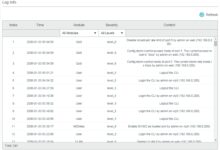
At their essence, system logs are timestamped entries created by software components to record operational activity. Each entry typically includes metadata such as severity level (e.g., INFO, WARNING, ERROR), source module, process ID, and user context. According to the ISO/IEC 27001 standard, logging is a critical control for information security management.
- Logs originate from kernels, services, daemons, and applications.
- They follow structured or semi-structured formats like syslog, JSON, or Windows Event Log.
- Each log entry helps reconstruct system behavior over time.
“System logs are the first line of defense in incident response.” — SANS Institute, 2023
Why System Logs Are Non-Negotiable in IT
In modern computing, system logs are indispensable. They enable administrators to detect anomalies, audit compliance, and ensure service continuity. For example, if a server suddenly crashes, logs can pinpoint whether it was due to memory exhaustion, a failed update, or a malicious intrusion. The absence of logs often leads to prolonged downtime and unresolved issues.
- Support forensic investigations after security breaches.
- Enable proactive monitoring through alerting systems.
- Facilitate regulatory compliance (e.g., HIPAA, GDPR).
Organizations that neglect system logs risk violating data protection laws and missing early signs of cyberattacks. A 2022 report by IBM’s Cost of a Data Breach Study found that companies with mature logging practices detected breaches 32 days faster on average.
Types of System Logs You Need to Know
Not all system logs are created equal. Different components generate distinct types of logs, each serving a unique purpose. Understanding these categories is essential for effective monitoring and analysis.
Operating System Logs
These are the foundation of system logging. Whether you’re using Linux, Windows, or macOS, the OS generates logs for boot sequences, user logins, driver loads, and kernel panics. On Linux, these are typically stored in /var/log, including files like syslog, auth.log, and kern.log. Windows uses the Event Viewer with channels like Application, Security, and System.
- Linux: Uses rsyslog or syslog-ng for log management.
- Windows: Employs Windows Event Log (EVTX) format.
- macOS: Combines ASL (Apple System Log) and Unified Logging System.
For deeper insights into Linux logging, check out the official rsyslog documentation.
Application Logs
Every application—from web servers like Apache and Nginx to databases like MySQL and PostgreSQL—generates its own logs. These logs capture application-specific events such as query execution times, failed transactions, or API call errors. For instance, Apache’s access.log records every HTTP request, while error.log details server-side problems.
- Web servers: Track visitor IPs, requested URLs, response codes.
- Databases: Log slow queries, connection attempts, replication status.
- Custom apps: Often use frameworks like Log4j or Serilog for structured output.
“Application logs are where business logic meets operational reality.” — DevOps Engineer, CloudTech Inc.
Security and Authentication Logs
These logs focus on access control and threat detection. They record user logins, password changes, privilege escalations, and failed authentication attempts. In Linux, auth.log or secure files track SSH logins; in Windows, the Security event log captures account logon events.
- Monitor for brute-force attacks via repeated failed logins.
- Detect unauthorized access using log correlation tools.
- Integrate with SIEM platforms like Splunk or ELK Stack.
The National Institute of Standards and Technology (NIST) emphasizes authentication logging in its Guide to Computer Security Log Management.
How System Logs Work Behind the Scenes
Understanding the mechanics of system logs reveals how data flows from event occurrence to storage and analysis. This process involves logging agents, protocols, and formatting standards that ensure consistency and reliability.
Log Generation and Sources
Logs are generated whenever a software component encounters a notable event. This could be a kernel detecting hardware failure, a firewall blocking an IP, or a user launching an application. Each source writes to a log file or sends messages to a centralized logging service.
- Sources include OS kernels, background services, network devices, and virtual machines.
- Events are classified by severity: DEBUG, INFO, NOTICE, WARNING, ERR, CRIT, ALERT, EMERG.
- Modern microservices architectures generate logs per container or pod.
For example, Docker containers emit logs via the docker logs command, which pulls output from stdout/stderr streams.
Logging Protocols and Standards
To ensure interoperability, several protocols govern how logs are transmitted. The most widely used is syslog, defined in RFC 5424, which allows devices to send log messages over UDP or TCP. Other standards include:
- CETF (Common Event Format): Used by IBM and enterprise systems.
- JSON over HTTP: Common in cloud-native applications.
- WELF (Windows Event Log Format): Proprietary to Microsoft environments.
The Internet Engineering Task Force (IETF) maintains syslog standards, available at RFC 5424.
Log Storage and Rotation
Raw logs can consume massive disk space. Therefore, systems use log rotation to manage size. Tools like logrotate on Linux compress old logs and delete them after a retention period. For example, a daily rotated Apache log might be archived as access.log.1.gz.
- Rotation prevents disk exhaustion.
- Archived logs can be stored offsite for compliance.
- Retention policies vary by industry (e.g., 90 days for PCI-DSS).
“Without log rotation, a single server can fill its disk in hours during high traffic.” — Senior SysAdmin, DataSecure LLC
The Critical Role of System Logs in Cybersecurity
In the battle against cyber threats, system logs are a frontline weapon. They provide visibility into attacker behavior, help identify vulnerabilities, and support post-incident forensics.
Detecting Intrusions with System Logs
Attackers leave digital footprints. A successful intrusion often begins with reconnaissance, followed by exploitation and lateral movement—all of which generate log entries. By analyzing logs, security teams can spot anomalies like:
- Unusual login times or geographic locations.
- Multiple failed SSH attempts followed by a success.
- Suspicious process executions (e.g.,
netcatormeterpreter).
Tools like OSSEC and Wazuh use real-time log analysis to detect such patterns and trigger alerts.
Forensic Investigations and Incident Response
After a breach, system logs are the primary source for reconstructing the attack timeline. Forensic analysts use logs to determine:
- When the attacker first gained access.
- Which systems were compromised.
- What data was exfiltrated.
The SANS Institute recommends preserving logs immediately after an incident to prevent tampering. Chain-of-custody procedures must be followed for legal admissibility.
“Logs are the breadcrumbs that lead you back to the attacker’s front door.” — Cybersecurity Analyst, ThreatIntel Corp
Compliance and Regulatory Requirements
Many regulations mandate logging as part of security controls. For instance:
- GDPR: Requires logging of data access and processing activities.
- HIPAA: Mandates audit trails for electronic health records.
- PCI-DSS: Specifies logging for all system components handling cardholder data.
Failure to maintain proper logs can result in fines or loss of certification. The U.S. Department of Health and Human Services has levied multi-million dollar penalties for HIPAA violations involving inadequate logging.
Best Practices for Managing System Logs
Effective log management isn’t just about collecting data—it’s about doing so securely, efficiently, and in a way that supports long-term analysis.
Centralized Logging with SIEM Solutions
Instead of checking logs on individual servers, organizations use Security Information and Event Management (SIEM) systems to aggregate logs centrally. Popular platforms include:
- Splunk: Powerful search and visualization capabilities.
- ELK Stack (Elasticsearch, Logstash, Kibana): Open-source alternative.
- Microsoft Sentinel: Cloud-native SIEM for Azure environments.
Centralization enables correlation across systems, faster detection, and easier reporting. Learn more at Splunk’s SIEM guide.
Log Retention and Archiving Policies
How long should you keep logs? The answer depends on compliance needs and storage capacity. Best practices include:
- Define retention periods based on risk and regulation.
- Use tiered storage: hot (SSD) for recent logs, cold (tape/cloud) for archives.
- Encrypt archived logs to protect sensitive data.
For example, financial institutions may retain logs for 7+ years, while startups might keep them for 30–90 days.
Securing System Logs from Tampering
If logs can be altered, they lose evidentiary value. To prevent tampering:
- Send logs to a remote, immutable storage system.
- Use write-once-read-many (WORM) storage.
- Implement file integrity monitoring (FIM) tools like AIDE or Tripwire.
“A log that can be edited is no log at all.” — NIST Special Publication 800-92
Tools and Technologies for Analyzing System Logs
Raw logs are useless without analysis. Fortunately, powerful tools exist to parse, visualize, and extract insights from system logs.
Open-Source Log Analysis Tools
For budget-conscious teams, open-source tools offer robust functionality:
- ELK Stack: Elasticsearch indexes logs, Logstash processes them, Kibana visualizes.
- Grafana Loki: Lightweight, designed for high-volume log streams.
- Graylog: Offers alerting, dashboards, and role-based access.
Graylog’s web interface makes it easy to search logs using query language. Visit graylog.org for tutorials.
Commercial Log Management Platforms
Enterprises often invest in commercial solutions for scalability and support:
- Datadog: Integrates logs with metrics and traces.
- Sumo Logic: Cloud-native analytics with machine learning.
- LogRhythm: Combines SIEM, log management, and SOAR.
These platforms offer advanced features like anomaly detection, automated response, and compliance reporting.
Real-Time Monitoring and Alerting
Waiting for a breach is too late. Real-time monitoring turns logs into actionable intelligence. Tools can be configured to send alerts when:
- A critical service crashes (e.g., MySQL stops).
- Unusual traffic spikes occur (possible DDoS).
- Unauthorized configuration changes are detected.
For example, Prometheus + Alertmanager can monitor log-based metrics exported via exporters.
Common Challenges and How to Overcome Them
Despite their value, managing system logs comes with hurdles. From volume overload to misconfigurations, these challenges can undermine effectiveness.
Log Volume and Noise Reduction
Modern systems generate terabytes of logs daily. Much of this is low-value noise (e.g., routine INFO messages). To reduce clutter:
- Filter out non-critical logs at the source.
- Use sampling for high-frequency events.
- Apply machine learning to classify and prioritize entries.
Google’s Site Reliability Engineering (SRE) team recommends focusing on ERROR and WARNING levels unless debugging.
Log Format Inconsistencies
Different applications use different formats—some use JSON, others plain text with custom delimiters. This makes parsing difficult. Solutions include:
- Enforcing structured logging across teams.
- Using log shippers like Fluentd or Filebeat to normalize formats.
- Creating parsing rules (grok patterns in Logstash).
“Inconsistent logs are the enemy of automation.” — DevOps Lead, ScaleUp Technologies
Performance Impact of Logging
Excessive logging can slow down applications. Writing to disk or network consumes I/O and CPU. To minimize impact:
- Use asynchronous logging libraries.
- Avoid logging in tight loops.
- Adjust log levels in production (e.g., disable DEBUG).
Netflix’s engineering blog highlights how they optimized logging in microservices to reduce latency by 15%.
Future Trends in System Logs and Log Management
As technology evolves, so do logging practices. Emerging trends are reshaping how we collect, store, and analyze system logs.
AI-Powered Log Analysis
Artificial intelligence is revolutionizing log management. AI models can detect anomalies, predict failures, and auto-remediate issues. For example:
- Unsupervised learning identifies unknown attack patterns.
- NLP techniques extract meaning from unstructured log text.
- Predictive analytics forecast disk space exhaustion.
Companies like BigPanda and Moogsoft use AI to reduce alert fatigue by correlating thousands of log events.
Cloud-Native and Containerized Logging
With Kubernetes and serverless computing, logs are ephemeral. Containers start and stop rapidly, making local log storage impractical. Best practices now include:
- Streaming logs directly to centralized systems.
- Using sidecar containers for log collection.
- Leveraging cloud provider tools (e.g., AWS CloudWatch, Google Cloud Logging).
The Cloud Native Computing Foundation (CNCF) promotes tools like Fluent Bit for efficient log forwarding.
Immutable and Blockchain-Based Logging
To ensure log integrity, some organizations are exploring blockchain-based logging. By writing hashes of log entries to a blockchain, any tampering becomes immediately detectable. While still niche, projects like LogSentinel and Guardtime offer tamper-proof audit trails.
- Each log entry is cryptographically signed.
- Hashes are stored on a distributed ledger.
- Provides verifiable proof of authenticity.
This approach is gaining traction in finance and healthcare sectors.
What are system logs used for?
System logs are used for troubleshooting, security monitoring, compliance auditing, performance analysis, and forensic investigations. They help IT teams understand what happened, when, and why within a computing environment.
How long should system logs be kept?
Retention periods vary by industry and regulation. Common durations range from 30 days (internal monitoring) to 7 years (financial or healthcare compliance). Always align with legal requirements and organizational policies.
Can system logs be faked or altered?
Yes, if not properly secured. Local logs can be deleted or modified by attackers with system access. To prevent this, send logs to a remote, immutable, and access-controlled server.
What is the difference between system logs and application logs?
System logs are generated by the operating system (e.g., kernel, services), while application logs come from specific software (e.g., web servers, databases). Both are crucial for full visibility.
Which tool is best for analyzing system logs?
The best tool depends on needs: ELK Stack for open-source flexibility, Splunk for enterprise power, or Datadog for cloud-native integration. Evaluate based on scalability, budget, and team expertise.
System logs are far more than technical artifacts—they are the heartbeat of your IT infrastructure. From diagnosing outages to thwarting cyberattacks, their value is undeniable. By understanding their types, leveraging the right tools, and following best practices, organizations can turn raw log data into actionable intelligence. As technology advances, so too will the sophistication of log management, with AI, cloud integration, and immutability leading the charge. Don’t overlook this critical resource; your system’s health and security depend on it.
Further Reading: